> For the complete documentation index, see [llms.txt](https://docs.adpage.io/llms.txt). Markdown versions of documentation pages are available by appending `.md` to page URLs; this page is available as [Markdown](https://docs.adpage.io/data-and-insights/marketing-integrations/integrations-overview.md).
# Integrations overview
Every data source you can connect to AdPage, what each one needs from you, and what it puts in your reports.
AdPage reports are only as complete as the sources behind them. Every integration on this page is **read-only**: AdPage pulls data in, and never writes back, changes a campaign or sends anything on your behalf. There are two deliberate exceptions: Google Tag Manager, which can be granted edit access, and [Returns to Google Ads](https://docs.adpage.io/optimize-your-setup/returns-to-google-ads), which retracts or lowers the Google Ads conversions of returned orders once you switch it on. Both pages say so explicitly.
### How connecting works
Almost every integration is stored **per container**. A customer with three webshops connects each container separately, and disconnecting one leaves the others alone. The exceptions are the AI assistants, which work at account level.
There are two ways in:
* **OAuth** — you are sent to the platform, you approve AdPage, and you come back. No password or key is ever typed into AdPage. Most advertising platforms work this way.
* **Keys** — you paste credentials you created in the other system. AdPage tests them before storing them, so a key that does not work is never saved.
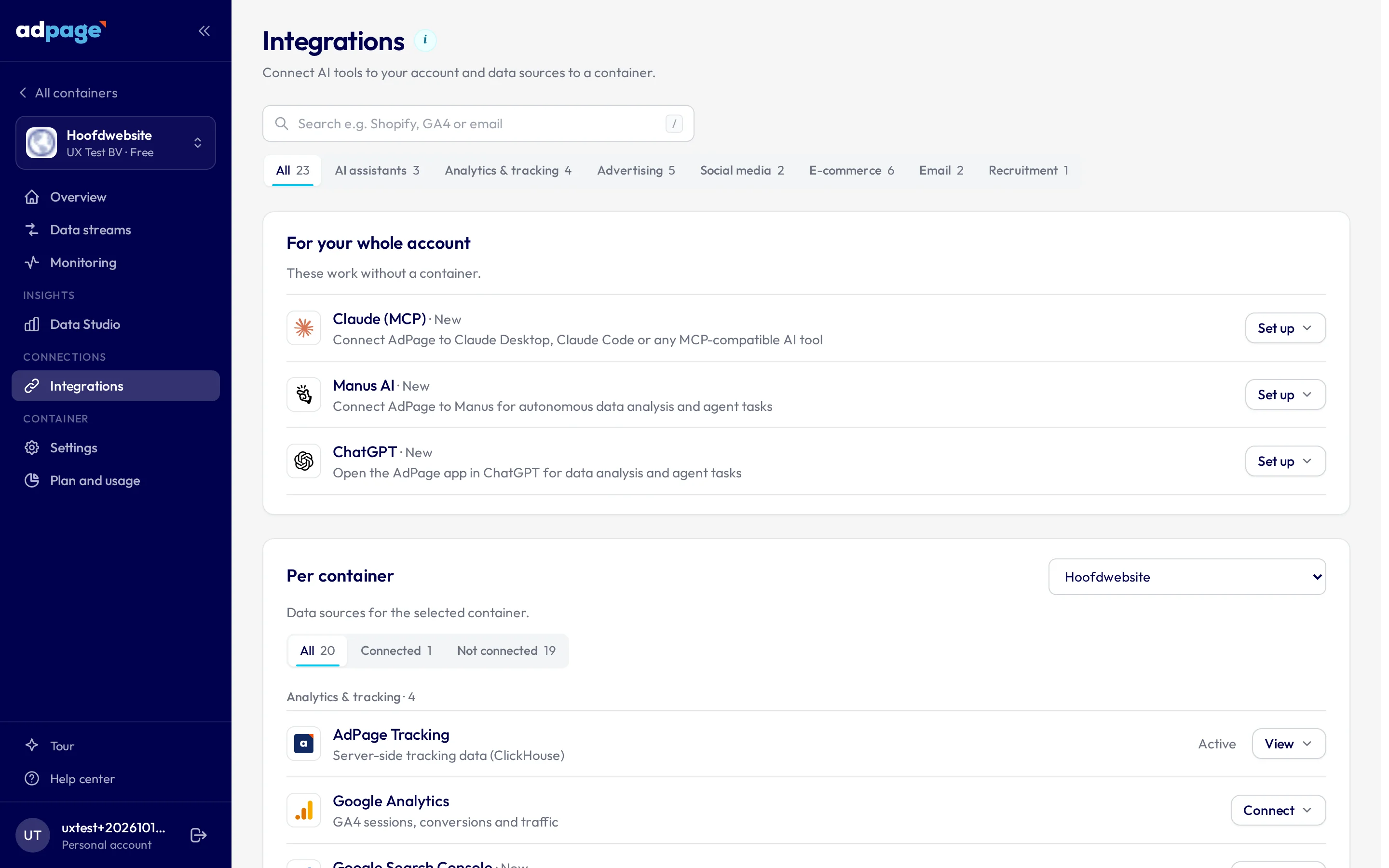
In both cases you start the same way: open **Integrations**, pick the container at the top of the page, then open the tile.
The Integrations page: pick your container at the top and open a tile.
### Who needs to do the connecting
Whoever completes an OAuth connection needs two things at once: an **AdPage login with access to that container**, and **access to the account at the platform** — the Google account that can see the GA4 property, the Facebook account with Analyst rights on the ad account, and so on.
That combination is worth thinking about before you start. If your client owns the ad account and you do not, either you are given access at the platform, or they are given an AdPage login for that container. There is no way to hand out a connect link that works without an AdPage account.
{% hint style="warning" %}
**Check which account you are signed in as before you approve.** When a connection starts — particularly when the Data Assistant sets one up for you — AdPage shows a confirmation screen naming the AdPage account you are in and the container the connection will be saved against, and warns you when that container is not visible in your account.
Read it. Approving from the wrong AdPage account stores the integration on the wrong container, and that screen is the only thing that catches it.
{% endhint %}
### Advertising
| Integration | How you connect | What it brings in |
| ------------------------------------------------------------------------------------------- | ----------------- | ------------------------------------------- |
| [Google Ads](/data-and-insights/marketing-integrations/google-ads.md) | OAuth (Google) | Campaign cost, clicks and conversions |
| [Meta Ads](/data-and-insights/marketing-integrations/meta-ads.md) | OAuth (Meta) | Facebook and Instagram cost and conversions |
| [TikTok Ads](/data-and-insights/marketing-integrations/tiktok-ads.md) | OAuth (TikTok) | TikTok campaign cost and conversions |
| [LinkedIn Ads](/data-and-insights/marketing-integrations/linkedin-ads.md) | OAuth (LinkedIn) | LinkedIn campaign cost and conversions |
| [Pinterest Ads](/data-and-insights/marketing-integrations/pinterest-ads.md) | OAuth (Pinterest) | Pinterest cost, conversions and Pin data |
| [Snapchat Ads](/data-and-insights/marketing-integrations/snapchat-ads.md) | OAuth (Snapchat) | Snapchat campaign cost and conversions |
| [Microsoft Advertising](/data-and-insights/marketing-integrations/microsoft-advertising.md) | OAuth (Microsoft) | Bing / Microsoft cost and conversions |
### Analytics and tagging
| Integration | How you connect | What it brings in |
| ------------------------------------------------------------------------------------------- | ------------------------------- | ------------------------------------------------------ |
| [Google Analytics](/data-and-insights/marketing-integrations/google-analytics.md) | OAuth (Google) | GA4 sessions, conversions and traffic sources |
| [Google Tag Manager](/data-and-insights/marketing-integrations/google-tag-manager.md) | OAuth (Google) | Tags, triggers and variables, for auditing |
| [Google Search Console](/data-and-insights/marketing-integrations/google-search-console.md) | OAuth (Google, its own sign-in) | Organic clicks, impressions and position, index status |
| [AdPage Tracking](/data-and-insights/marketing-integrations/adpage-tracking.md) | Already on | Your own server-side tracking data |
### Webshop and orders
| Integration | How you connect | What it brings in |
| ------------------------------------------------------------------------------------ | --------------- | --------------------------------------------------- |
| [Shopify](/data-and-insights/marketing-integrations/shopify.md) | OAuth (Shopify) | Orders, products, customers and stock |
| [Magento](/data-and-insights/marketing-integrations/magento.md) | API keys | Orders, revenue and product data |
| [Shopware](/data-and-insights/marketing-integrations/shopware.md) | API keys | Orders, revenue and product data |
| [Lightspeed](/data-and-insights/marketing-integrations/lightspeed.md) | API keys | Orders and revenue from Lightspeed eCom |
| [Returnista](/data-and-insights/marketing-integrations/returnista.md) | API key | Returns, return reasons and return rate per channel |
| [Returnless](/data-and-insights/marketing-integrations/returnless.md) | API key | Returns, return reasons and return rate per channel |
| [AdPage Feed](/data-and-insights/marketing-integrations/adpage-feed-your-own-api.md) | Your own API | Weekly revenue and returns from any system |
### Email and lifecycle
| Integration | How you connect | What it brings in |
| --------------------------------------------------------------------------- | ---------------- | ------------------------------------------------------ |
| [Klaviyo](/data-and-insights/marketing-integrations/klaviyo.md) | OAuth (Klaviyo) | Campaign and flow revenue, list growth |
| [MailCampaigns](/data-and-insights/marketing-integrations/mailcampaigns.md) | API key + token | Mailings, opens, clicks and email revenue |
| [Spotler Mail+](/data-and-insights/marketing-integrations/spotler-mail.md) | API key + secret | Mailings, clicks, weekly send volume and email revenue |
### Organic and AI
| Integration | How you connect | What it brings in |
| ----------------------------------------------------------------------------------------------------------- | --------------------- | ------------------------------------------------ |
| [Facebook & Instagram organic](/data-and-insights/marketing-integrations/facebook-and-instagram-organic.md) | Part of Meta OAuth | Followers, reach, engagement and top posts |
| [AI assistants](/data-and-insights/marketing-integrations/ai-assistants-mcp.md) | Account-level sign-in | Your AdPage data inside Claude, ChatGPT or Manus |
### Not every tile is visible to everyone
Some integrations are released gradually and are switched on per customer: Shopify, Snapchat Ads, Pinterest Ads, Microsoft Advertising, Klaviyo, Facebook & Instagram organic, and the AdPage Feed. If a tile from this list is missing on your Integrations page, it has not been enabled for your account yet — ask to turn it on.
### When a connection breaks
OAuth access does not last forever. Someone changes their password, removes AdPage from their connected apps, or loses access to the ad account — and the connection stops.
For Google Analytics, Google Ads, Google Tag Manager, Google Search Console, Meta, TikTok, LinkedIn and Pinterest, AdPage checks this automatically every day and emails you when a connection needs attention. Snapchat, Microsoft Advertising, Klaviyo and the key-based integrations are not yet part of that daily check, so for those a tile that says the connection expired is the first signal.
{% hint style="warning" %}
**Google Analytics, Google Ads and Google Tag Manager share one access.** They are approved through a single Google account. If that access is withdrawn, all three stop at once — reconnecting one does not bring the other two back, so check all three.
Google Search Console is the exception: it has its own Google sign-in, so it keeps working when the other three stop, and needs reconnecting on its own when it breaks.
{% endhint %}
---
# Agent Instructions
This documentation is published with GitBook. GitBook is the documentation platform designed so that both humans and AI agents can read, navigate, and reason over technical content effectively. Learn more at gitbook.com.
## Querying This Documentation
If you need additional information that is not directly available in this page, you can query the documentation by asking a question.
Perform an HTTP GET request on the following URL with the `ask` and `goal` query parameters:
```
GET https://docs.adpage.io/data-and-insights/marketing-integrations/integrations-overview.md?ask=&goal=
```
`ask` is the immediate question: it should be specific, self-contained, and written in natural language.
`goal` is what the user is ultimately trying to achieve, the reason they need the answer. Sharing it helps GitBook give you a better, more relevant answer. A goal is most helpful when it describes the outcome the user wants rather than restating the question. For example, with `ask=how do I create an API token`, a goal like `automate deployments from our CI pipeline` lets GitBook tailor the answer to that use case.
The response will contain a direct answer to the question and relevant excerpts and sources from the documentation.
Use this mechanism when the answer is not explicitly present in the current page, you need clarification or additional context, or you want to retrieve related documentation sections.