> For the complete documentation index, see [llms.txt](https://docs.adpage.io/llms.txt). Markdown versions of documentation pages are available by appending `.md` to page URLs; this page is available as [Markdown](https://docs.adpage.io/data-and-insights/marketing-integrations/returnless.md).
# Returnless
Connect Returnless to see returns, return reasons and return rate per channel and campaign — and what your advertising really earned.
Connect Returnless so AdPage knows what came back. Returns are the difference between revenue and income, and a channel with a 40% return rate is not the channel your ROAS says it is.
AdPage only reads from Returnless. It cannot create, approve or change a return.
### Before you start
You need an **API key** from Returnless. Create one in the Returnless return panel under **Integrations → API keys**.
AdPage links each return to its order by order number, using the orders your webshop sends to AdPage. Returnless does not always write that number the way your webshop shows it: it can give 265100 for the Shopify order #2265100. AdPage recognises the order number, the order name and the Shopify order ID alike. Without those order webhooks, AdPage can count returns but cannot tell which channel or campaign they came from.
### Connect Returnless
{% stepper %}
{% step %}
#### Open the tile
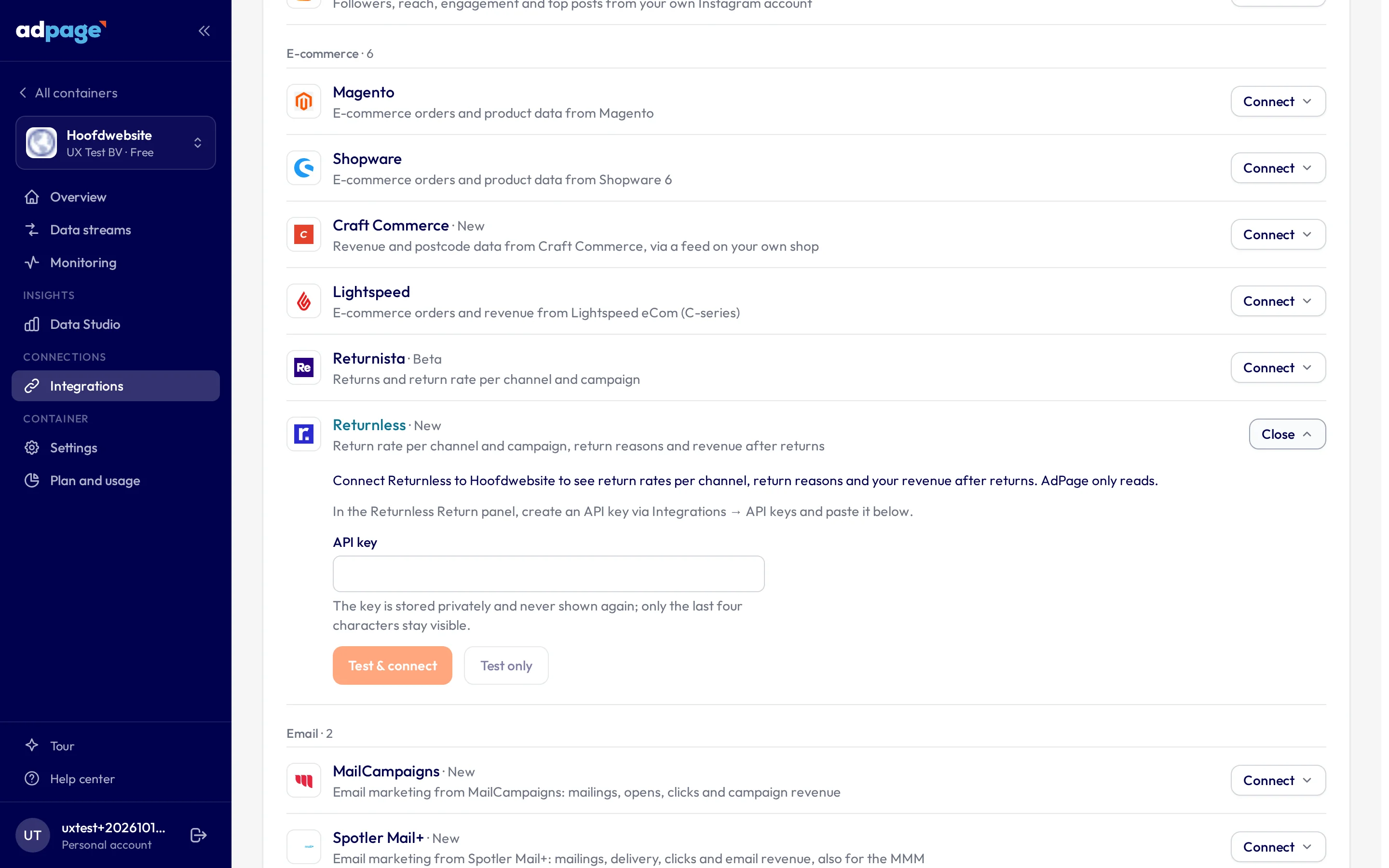
Go to **Integrations**, select the container, and open the **Returnless** tile.
The Returnless tile on the Integrations page.
{% endstep %}
{% step %}
#### Paste the API key
Paste the key and connect. You can also test a key first without saving it.
{% endstep %}
{% step %}
#### Wait for the first sync
AdPage tests the key against Returnless before storing it, so a key that fails is never saved. The key is stored privately and never shown again: the tile only shows its last four characters.
Right after connecting, AdPage fetches the returns of the last 400 days, newest first. A large history may not fit in one go; the daily sync then finishes it. After that, new returns and status changes come in every day.
{% endstep %}
{% endstepper %}
### What you get
The **Returns** view inside **Business & Revenue**:
* **Returns and net revenue** — revenue, return value, net revenue and return rate of the orders placed in the period.
* **Return rate per channel and campaign** — which traffic sources and campaigns bring customers who send things back, and what is left after returns.
* **Return reasons** — how often each reason comes up and how much return value is behind it.
* **Returns per day** — the number of returns and their value, on the day they came in.
Returns also flow into **Profit on Adspend** when it is based on your order webhooks: a net ROAS, and a profit that subtracts what returns cost you — the refunded value minus the cost price of the products that come back.
And you can send them to Google Ads. With [Returns to Google Ads](https://docs.adpage.io/optimize-your-setup/returns-to-google-ads) switched on, AdPage retracts or lowers the conversions of returned orders, so Smart Bidding optimizes on the revenue you keep.
### What counts as a return
* A return counts from the moment it is registered in Returnless. If it is cancelled, rejected or expires, it drops out again with the next sync. Test returns never count.
* Exchanges and repairs count towards the return rate with a value of 0: the product came back, but the revenue stays.
* The return value is the refund Returnless reports for the return.
### Reading the numbers
{% hint style="warning" %}
**A return lands weeks after the sale.** A customer buys in week 1 and returns in week 4, so the current month's return rate always looks better than it will turn out to be. Never compare a recent period's return rate against a settled one — the recent one is incomplete by definition, not better.
{% endhint %}
**Return rate is a property of the product as much as the channel.** Clothing returns more than electronics. A channel selling mostly apparel will show a higher rate without performing worse. Compare like for like.
**Returns are attributed to the original order.** Return rate per channel and campaign counts by order date, so a channel's history keeps changing as returns arrive. Return reasons and returns per day count by the date the return came in.
### Troubleshooting
**The key is rejected.** Check that you copied the whole key, and that it comes from the Returnless account of this webshop.
**The tile asks you to connect again.** Returnless refuses the stored key, usually because it was deleted in Returnless. Create a new key and paste it in the tile.
**Connected, but no returns.** The first sync may still be running, or the account has no returns in the period. Give it a few minutes and check the period.
**The widgets say few returns find their order.** Returnless probably uses a different order number than your webshop sends to AdPage — an internal ID, for example, instead of the number your customer sees. Returns on orders placed before your order webhooks were connected have nothing to attach to either.
**An order number from Returnless finds a different order in Shopify.** Returnless can write the number without your webshop's prefix, such as 265100 for #2265100. Searching Shopify for 265100 may then find an older order with that name. Search for the full order name instead: that is the order AdPage links the return to.
**The widgets say AdPage sees no orders.** Without order webhooks, returns cannot be linked to orders and channels. Check that your webshop sends its orders to AdPage.
Still stuck? Contact with the container — never the key.
---
# Agent Instructions
This documentation is published with GitBook. GitBook is the documentation platform designed so that both humans and AI agents can read, navigate, and reason over technical content effectively. Learn more at gitbook.com.
## Querying This Documentation
If you need additional information that is not directly available in this page, you can query the documentation by asking a question.
Perform an HTTP GET request on the following URL with the `ask` and `goal` query parameters:
```
GET https://docs.adpage.io/data-and-insights/marketing-integrations/returnless.md?ask=&goal=
```
`ask` is the immediate question: it should be specific, self-contained, and written in natural language.
`goal` is what the user is ultimately trying to achieve, the reason they need the answer. Sharing it helps GitBook give you a better, more relevant answer. A goal is most helpful when it describes the outcome the user wants rather than restating the question. For example, with `ask=how do I create an API token`, a goal like `automate deployments from our CI pipeline` lets GitBook tailor the answer to that use case.
The response will contain a direct answer to the question and relevant excerpts and sources from the documentation.
Use this mechanism when the answer is not explicitly present in the current page, you need clarification or additional context, or you want to retrieve related documentation sections.