> For the complete documentation index, see [llms.txt](https://docs.adpage.io/llms.txt). Markdown versions of documentation pages are available by appending `.md` to page URLs; this page is available as [Markdown](https://docs.adpage.io/optimize-your-setup/consent-management/trigger-sequence-for-consent-processing.md).
# Trigger sequence for consent processing
How do you ensure the tags that have to fire on every page, fire after the given consent has been processed?
## Setting up the triggering order for consent processing
In this article we cover how to make sure your tags that have to fire on every page (page\_view event tags, Hotjar or Clarity, etc) fire correctly to ensure the given consent has been processed.
### Why does consent processing matter?
When someone visits your website for the first time, they haven't given consent for cookies and tracking yet. That means tags like the page\_view event tags won't fire with all data (GA4 event tags will send cookieless pings) or won't fire at all (Meta Ads tag with additional consent checks set up). So in your tracking setup, you'll need to wait until consent has been fully processed before you try to fire your page\_view tags.
***
### A trigger for the consent update on every page
Google Tag Manager offers 5 standard triggers for a page load. But none of those 5 wait for the consent signals to fully process. That's why you'll want to set up tags that are reliant on the given consent with a trigger that ensures all given consent has been processed.
Depending on the Consent Management Platform (CMP) you use, a specific dataLayer event push may take place the moment consent is updated.
#### Consent Studio, CookieYes and Cookiebot
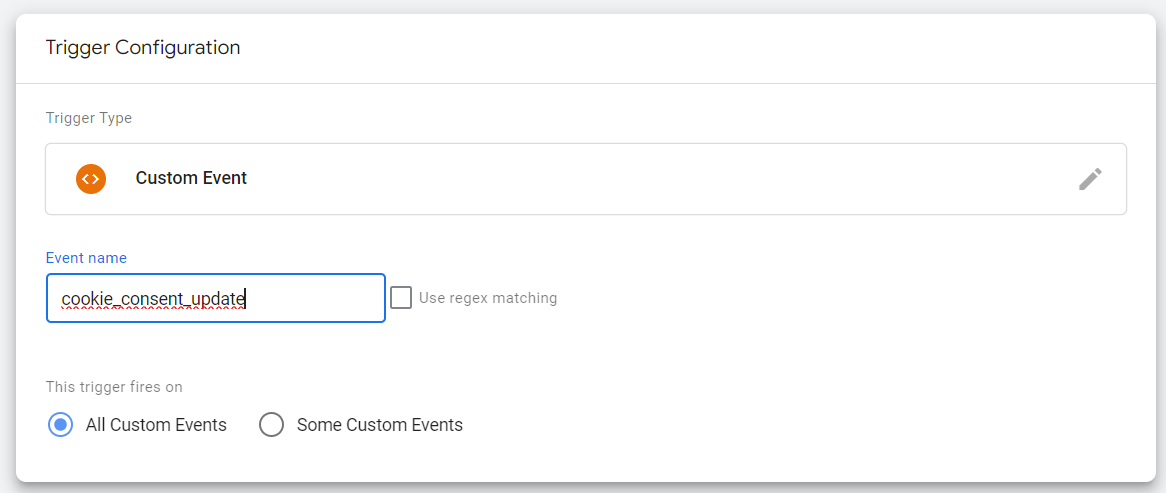
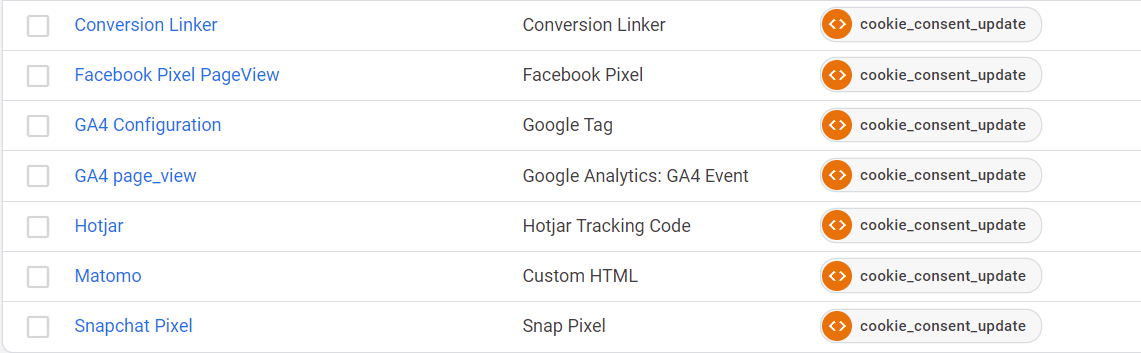
After a visitor gives consent through a Cookiebot or Consent Studio banner, a dataLayer event called `cookie_consent_update` appears on every page. You can set all your triggers on this for a complete setup, including the Google Tag and the page\_view event tags. Make sure all other event tags never fire before `cookie_consent_update`, but always after it.
**Steps for setting up the trigger**
1. Create a Custom Event trigger with the name `cookie_consent_update`.
2. Replace the triggers on all tags that need to fire on every page with this trigger.
3. Replace the triggers on all tags that could fire before `cookie_consent_update` lands in the dataLayer, as follows:
* Triggering based on thank you pages: use a dedicated `cookie_consent_update` trigger.
* Triggering based on a dataLayer event that can fire earlier than `cookie_consent_update`: add it to a trigger group.
**Trigger adjustment:**
You can change all your thank you page triggers into Custom Event triggers that listen for the event name `cookie_consent_update`.
**Trigger group:**
If a trigger can fire before `cookie_consent_update`, you can place it in a trigger group together with `cookie_consent_update`. A trigger group waits until every trigger in the group has fired on a page before it can activate.
#### Other Consent Management Platforms
Not every CMP pushes a dataLayer event when consent is updated, and the ones that do don't always name it `cookie_consent_update`. So if you're not using Cookiebot, CookieYes or Consent Studio, you'll need to find out for yourself what your CMP makes available. The only reliable way to do that is to watch it happen in Google Tag Manager preview mode.
1. Open the Google Tag Manager web container's preview mode on your site and clear all cookies for the domain, so you're treated as a brand new visitor.
2. Accept all cookies in the banner.
3. Look at the event stream in the left-hand column and find the gtag **Consent Update** call.
4. Check whether a dataLayer event push appears **after** that consent update call.
If you find one, the next question is whether it repeats. Reload the page a few times and click through to a second page without clearing your cookies. An event that only appears once, at the moment someone interacts with the banner, isn't the one you're looking for here. What you need is an event that fires on every page load once consent is already stored, because that's what lets you hang your page\_view tags on it the same way you would with `cookie_consent_update`. If the event only shows up on that first interaction, the approach in the next section is the one to use instead.
And if there's no dataLayer event push after the consent update at all, then your CMP simply doesn't give you anything to trigger on. In that case you can't reliably control the order in which your tags fire, which means you'll keep losing the campaign parameters and referrer data from the first page of a session. That's the point at which we'd suggest moving to a CMP that does push a consent update event. Cookiebot and Consent Studio both do, and both integrate cleanly with the setup described above.
---
# Agent Instructions
This documentation is published with GitBook. GitBook is the documentation platform designed so that both humans and AI agents can read, navigate, and reason over technical content effectively. Learn more at gitbook.com.
## Querying This Documentation
If you need additional information that is not directly available in this page, you can query the documentation dynamically by asking a question.
Perform an HTTP GET request on the current page URL with the `ask` query parameter, and the optional `goal` query parameter:
```
GET https://docs.adpage.io/optimize-your-setup/consent-management/trigger-sequence-for-consent-processing.md?ask=&goal=
```
`ask` is the immediate question: it should be specific, self-contained, and written in natural language.
`goal` is optional and describes the broader end goal you are ultimately trying to accomplish on behalf of the user. GitBook uses it to tailor the answer towards what is most useful for that goal.
The response will contain a direct answer to the question and relevant excerpts and sources from the documentation.
Use this mechanism when the answer is not explicitly present in the current page, you need clarification or additional context, or you want to retrieve related documentation sections.
.png?alt=media&token=d753a316-e6ca-4708-9af8-c99cabeb9b09)